USB
USB is a fallback for a Mac with no Bluetooth link.
A paired Mac in range reconnects within a second, before No link can be used,
so there USB takes forgetting Claude Remote on the Mac or turning its Bluetooth off.
Taking USB
No link shows a black plate, Switch to and the USB mark.
Hold Right on it until the long press fires,
and connect the cable, before or after.
The hold counts only if Right went down on that screen,
and it neither buzzes nor flashes.
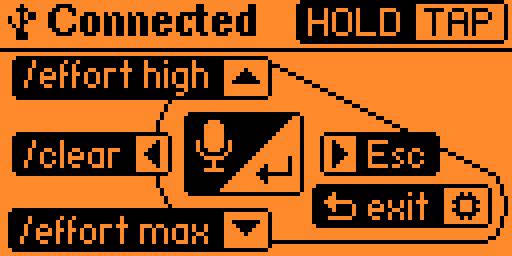
The status row then carries the USB mark,
Connect the cable until the cable is in,
and Connected once it is.
What the Mac asks
A Mac laptop with Apple silicon asks before it trusts a new USB accessory,
and it did for this keyboard, the first time.
Allow it: declined, the Mac ignores the keyboard,
though the screen may read Connected.
Keyboard Setup Assistant did not open.
What USB changes
The buttons, the keys and keybindings.json stay the same,
and Claude Code setup needs nothing more.
The device has no USB console until it leaves USB,
so mise run launch finds no device.
A minute with no link still ends in Reconnect stopped, with the backlight off.
A cable connected then waits for a press.
Returning
With the cable out, No link shows the plate with the Bluetooth mark.
Hold Right on it to return to Bluetooth,
with no need to leave the app.
Holding Back leaves the app, from either link.
The link is not saved: the next launch opens on Bluetooth.